How to add columns text box filter in DataTable use of jQuery (jQuery का उपयोग करके DataTable में कॉलम टेक्स्ट बॉक्स फ़िल्टर कैसे जोड़ें)-
In this example, we are showing how to Integration search boxes in the individual columns below the column headers in the row of the table (इस उदाहरण में, हम दिखा रहे हैं कि टेबल की पंक्ति में स्तंभ शीर्षकों के नीचे अलग-अलग स्तंभों में खोज बॉक्स को कैसे एकीकृत किया जाए).
First of all, we get the dynamic records from the MySQL table and put it in the HTML table as show bellow (सबसे पहले हम MySQL तालिका से डायनामिक रिकॉर्ड प्राप्त करते हैं तथा इसे HTML तालिका में डालते हैं जैसा कि नीचे दिखाया गया है)-
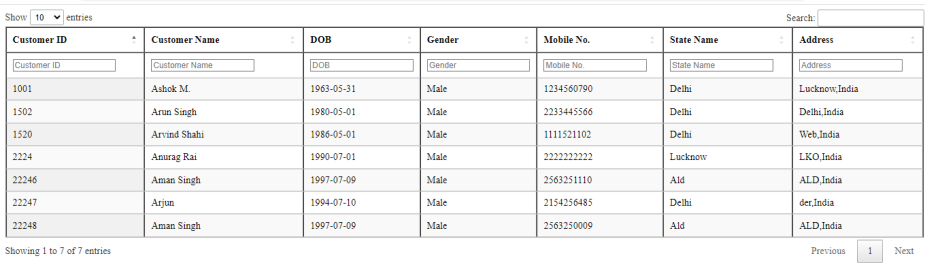
- Create customer.php file and add bellow code (customer.php फ़ाइल बनाएं और नीचे दिया गया कोड जोड़ें)-
<?php
$mysqli = new mysqli("localhost","root","","test123");
// Check connection
if ($mysqli -> connect_errno) {
  echo "Failed to connect to MySQL: " . $mysqli -> connect_error;
  exit();
}
?>
<!DOCTYPE html>
<html>
<head>
<script src="https://codeloveguru.com/master-library/js/jquery.min.js"></script>
<script src="https://codeloveguru.com/master-library/js/jquery.dataTables.min.js"></script>
<script src="https://cdn.datatables.net/fixedheader/3.2.3/js/dataTables.fixedHeader.min.js"></script>
<link rel="stylesheet" href="https://codeloveguru.com/master-library/css/jquery.dataTables.min.css">
<link rel="stylesheet" href="https://cdn.datatables.net/fixedheader/3.2.3/css/fixedHeader.dataTables.min.css">
<script>
$(document).ready(function () {
    // Setup - add a text input to each footer cell
    $('#example thead tr')
        .clone(true)
        .addClass('filters')
        .appendTo('#example thead');

    var table = $('#example').DataTable({
        orderCellsTop: true,
        fixedHeader: true,
        initComplete: function () {
            var api = this.api();
            // For each column
            api
                .columns()
                .eq(0)
                .each(function (colIdx) {
                    // Set the header cell to contain the input element
                    var cell = $('.filters th').eq(
                        $(api.column(colIdx).header()).index()
                    );
                    var title = $(cell).text();
                    $(cell).html('<input type="text" placeholder="' + title + '" />');

                    // On every keypress in this input
                    $(
                        'input',
                        $('.filters th').eq($(api.column(colIdx).header()).index())
                    )
                        .off('keyup change')
                        .on('change', function (e) {
                            // Get the search value
                            $(this).attr('title', $(this).val());
                            var regexr = '({search})'; //$(this).parents('th').find('select').val();

                            var cursorPosition = this.selectionStart;
                            // Search the column for that value
                            api
                                .column(colIdx)
                                .search(
                                    this.value != ''
                                        ? regexr.replace('{search}', '(((' + this.value + ')))')
                                        : '',
                                    this.value != '',
                                    this.value == ''
                                )
                                .draw();
                        })
                        .on('keyup', function (e) {
                            e.stopPropagation();

                            $(this).trigger('change');
                            $(this)
                                .focus()[0]
                                .setSelectionRange(cursorPosition, cursorPosition);
                        });
                });
        },
    });
});
</script>
</head>
<body>
<table id="example" border="1" class="display" width="200px;">
        <thead>
            <tr>
                <th>Customer ID</th>
                <th>Customer Name</th>
                <th>DOB</th>
                <th>Gender</th>
                <th>Mobile No.</th>
				<th>State Name</th>
				<th>Address</th>

            </tr>
        </thead>
        <tbody>
		<?php
			$sql = "SELECT * FROM customer_new";
			$result = $mysqli -> query($sql);
			while($row = mysqli_fetch_array($result, MYSQLI_ASSOC)){
		?>
          <tr>
             <td><?php echo !empty($row['Customer_id']) ? $row['Customer_id'] : ''; ?></td>
             <td><?php echo !empty($row['customer_name']) ? $row['customer_name'] : ''; ?></td>
             <td><?php echo !empty($row['DOB']) ? $row['DOB'] : ''; ?></td>
				     <td><?php echo !empty($row['Sex']) ? $row['Sex'] : ''; ?></td>
				     <td><?php echo !empty($row['Mobile_no']) ? $row['Mobile_no'] : ''; ?></td>
				     <td><?php echo !empty($row['State_name']) ? $row['State_name'] : ''; ?></td>
				     <td><?php echo !empty($row['Address']) ? $row['Address'] : ''; ?></td>
          </tr>
		<?php  } ?>
        </tbody>
    </table>
</body>
</html>
How to add export buttons pdf csv excel in datatable…
Add Multiple Columns search box filter in DataTables
Tags: Add Multiple Columns search box filter in DataTables, How to add columns text box filter in datatable, How to add Integration columns textbox filters in jQuery, Integration search boxes in the columns